 Catalog
Qwen3-TTS in ComfyUI, with voice cloning
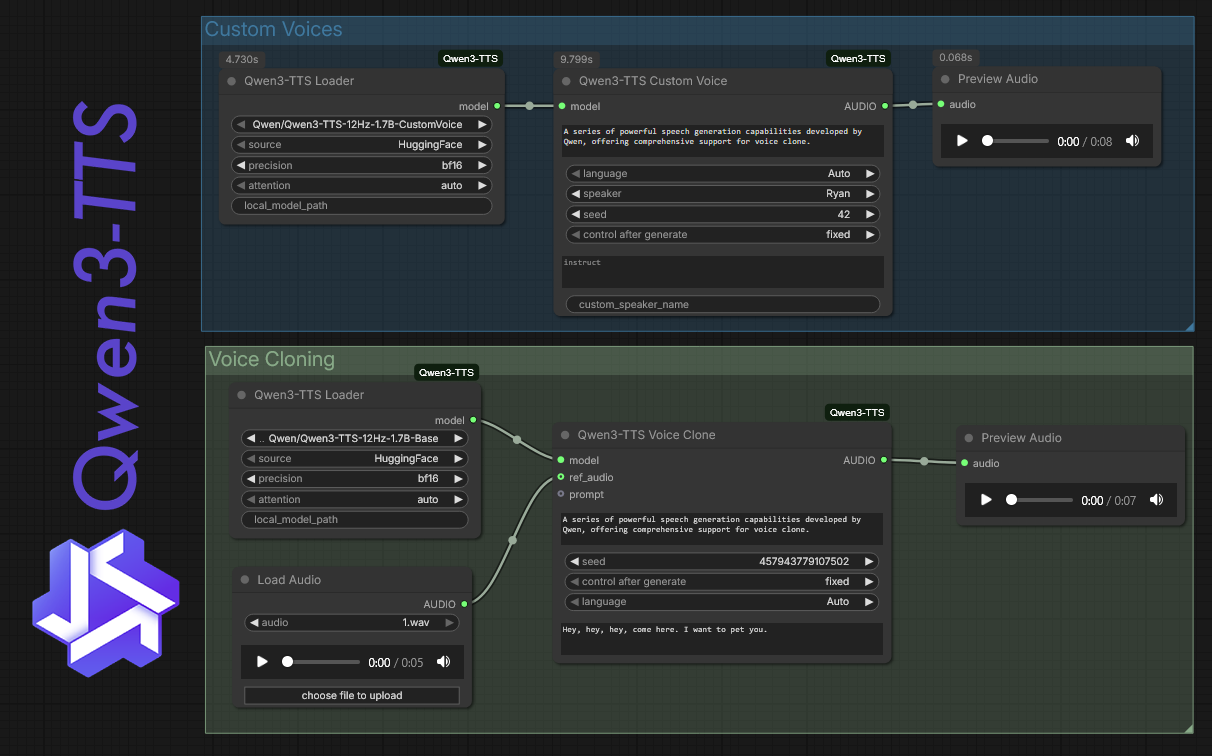
A custom node suite that brings Alibaba's Qwen3-TTS models into your ComfyUI workflow, letting you generate, design, and clone voices without leaving the graph.
What it is. A set of custom nodes by DarioFT that wires Alibaba’s Qwen3-TTS into ComfyUI. You get access to the 1.7B and 0.6B model variants and a handful of modes: voice design from a description, voice cloning from an audio sample, and fine-tuning if you want to push further.
What it plugs into. ComfyUI. The nodes sit in your graph the same way image or video nodes do, so you can chain TTS output directly into other parts of a workflow rather than bouncing between separate apps.
Why it helps. Getting clean, controllable voice audio into a motion or video workflow usually means a detour through a separate tool and then manually syncing the result. Having TTS as a node means you can prototype a voiceover, adjust the prompt, and re-run it inside the same session where you’re building everything else. The voice cloning mode is the part most creatives will reach for first — feed it a short reference clip and it targets that speaker’s character.
How to set it up. Install through ComfyUI Manager or clone the repo into your custom_nodes folder. The models download on first run, so you’ll want a patient connection the first time. The 0.6B variant is the lighter option if you’re working on a GPU with less headroom. From there, drop the nodes into a graph, wire in your text prompt, pick your mode, and run.
Limits. The output quality is tied to how good Qwen3-TTS actually is, and like most open TTS models it can stumble on unusual names, heavy punctuation, or long runs of dense text. Voice cloning works better with clean, dry reference audio — noisy samples produce noisy clones. Fine-tuning adds flexibility but it asks for more setup time and more VRAM. And because this is a community node wrapping a fast-moving upstream model, expect the occasional rough edge when Qwen3-TTS itself updates.
More Plugins & Skills
 New
New Point an AI coding agent at a product URL and get a working Remotion project back, no video-generation model in the loop.
Remotion ad video skill: code-driven ads from a URL
MAY 19
A set of 19 Claude Code skills that wire Claude directly into Higgsfield AI, so you can generate images, kick off Seedance 2.0 video jobs, and run full UGC ad pipelines from a single automated workflow.
Claude Code skills for Higgsfield AI video and image pipelines
APR 13
A set of structured skills for tools like Cursor or Copilot that steer the AI through a real design process instead of letting it freestyle.