 Catalog
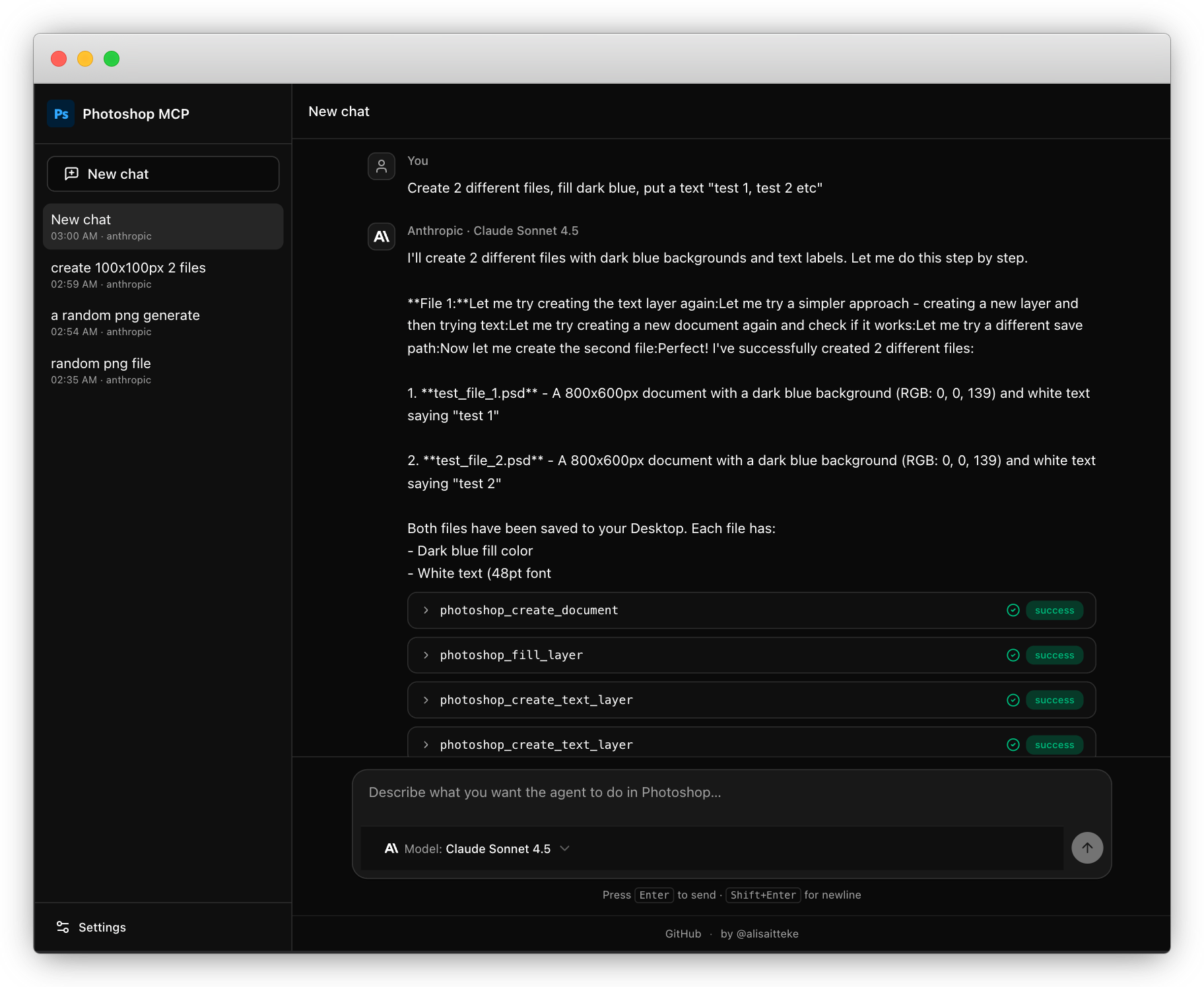
Control Photoshop from an AI assistant via MCP
An open-source MCP server that lets Claude and other AI assistants drive Photoshop directly, so you can describe what you want and watch the layers move.
What it is. An open-source MCP server, built by alisaitteke, that exposes over 50 Photoshop actions to any AI assistant that speaks the Model Context Protocol. Under the hood it runs ExtendScript, the same scripting engine Photoshop has always had, but surfaced through a layer that Claude or another MCP-compatible assistant can call directly.
What it plugs into. Adobe Photoshop on macOS or Windows, and any AI assistant that supports MCP, with Claude being the obvious pairing. You run the server locally alongside Photoshop, and the assistant talks to it.
Why it helps. The pitch is that you describe an edit in plain language and the assistant executes it in the actual application, layers, masks, adjustments and all, rather than generating a flattened image from scratch. For repetitive work, batch renaming layers, applying the same adjustment across a set of files, building out a document structure, that kind of thing is where this starts to feel genuinely useful rather than just interesting.
How to set it up. Clone the repo, install the Node dependencies, and point your MCP-compatible assistant at the server. The repo is TypeScript, so you will need Node on your machine. From there you configure your assistant to connect to the local server, open Photoshop, and start giving instructions. The GitHub readme walks through the connection steps.
Limits. With 102 stars at the time of writing, this is early and lightly tested in production. The quality of what the assistant can do is bounded by how well ExtendScript can express it, and complex compositing work will bump into those limits quickly. It also requires Photoshop to already be open and running, so it is a co-pilot setup, not a headless pipeline. Windows support is listed but the project feels Mac-first in practice, and there is no guarantee of stability across Photoshop versions.
More Plugins & Skills
 New
New Point an AI coding agent at a product URL and get a working Remotion project back, no video-generation model in the loop.
Remotion ad video skill: code-driven ads from a URL
MAY 19
A set of 19 Claude Code skills that wire Claude directly into Higgsfield AI, so you can generate images, kick off Seedance 2.0 video jobs, and run full UGC ad pipelines from a single automated workflow.
Claude Code skills for Higgsfield AI video and image pipelines
APR 13
A set of structured skills for tools like Cursor or Copilot that steer the AI through a real design process instead of letting it freestyle.